The lookup table tblWallThickness specifies the recommended minimum and maximum wall thickness for each process and material:
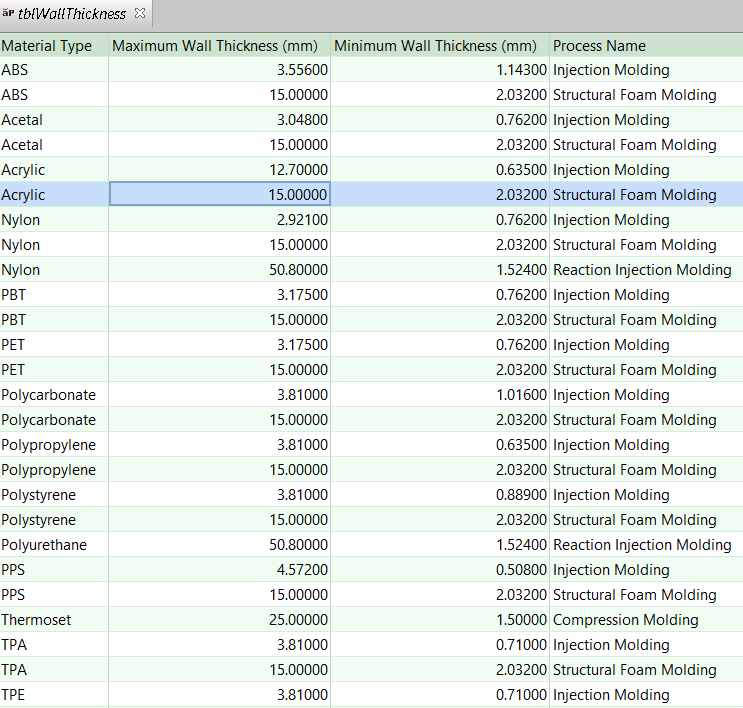
If the thickness of some portion of a part’s wall falls outside of the range specified in the tblWallThickness table, aPriori lists a Minimum Wall Thickness or a Maximum Wall Thickness issue in the Design For Manufacture section of the Design Guidance tab (see below).
In addition, the Thickness panel of the Design Guidance tab displays the Recommended Maximum and/or Recommended Minimum thickness:

Minimum Wall Thickness
Thin walls cause the plastic to cool faster during the molding, which increases the risk of misruns due to short shots. Thin walls also have lower stiffness so may distort during cooling. aPriori checks if the Min Thickness of the part (extracted from geometry) is less than the minimum wall thickness allowed for the selected material. To calculate the maximum wall thickness allowed, aPriori performs a lookup in the tblWallThickness table and returns the Minimum Wall Thickness corresponding to the Material Type being used, so long as it is compatible with the molding process.
If the part Min Thickness is less than the minimum thickness allowed, aPriori lists a Minimum Wall Thickness issue as a Potential Cost Driver, displays the current and suggested thickness values, describes the impact, and provides advice for the user.
Maximum Wall Thickness
Thick walls have a lower cooling rate, increasing the risk of hot spots of plastic remaining inside sections that have otherwise solidified. The hot spot contracts as it cools, which can cause sink marks on the exterior of the part, resulting in cosmetic blemishes and more defects. aPriori checks if the Max Thickness of the part (extracted from geometry) is greater than the maximum wall thickness allowed for the selected material. To calculate the maximum wall thickness allowed, aPriori performs a lookup in the tblWallThickness table and returns the Maximum Wall Thickness corresponding to the Material Type being used, so long as it is compatible with the molding process.
If the part Max Thickness is greater than the maximum thickness allowed, aPriori lists a Maximum Wall Thickness issue as a Potential Cost Driver, displays the current and suggested thickness values, describes the impact, and provides advice for the user.